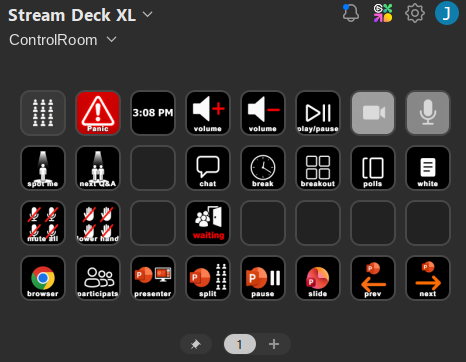
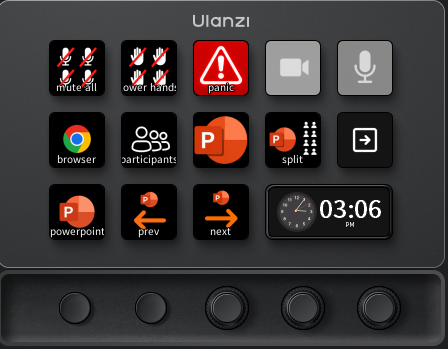
Guided Zoom meeting control, built into hardware you press with your hand.
ControlRoom sells confidence, not convenience. It’s a ready-to-use control system for running Zoom meetings and presentations — built on hardware decks like the Stream Deck XL and Ulanzi D200X, pre-configured so a presenter or producer can turn on camera and mic, start PowerPoint, spotlight the speaker, and hand off to the next question, all with a single button press instead of hunting through Zoom’s menus while people are watching.
Why it exists: running a polished virtual or hybrid session means constantly juggling spotlight changes, screen shares, waiting rooms, and camera switches in real time — usually with no producer sitting next to you. ControlRoom turns that into guided, one-touch control: the same setup we use to produce our own client events, now built for anyone who presents on Zoom alone.
Built for the moment nobody plans for
Every presenter eventually hits a moment where something breaks mid-session — a slide won’t advance, a connection hiccups, a question comes in you’re not ready for — right in front of a live audience. The Panic button is the reason ControlRoom exists. One press instantly covers your screen with a professional “Technical Difficulties” card that rotates through built-in messages for about 90 seconds, while your mic mutes and your camera turns off automatically. Press it again once you’ve handled the issue, and your mic, camera, and screen come right back. Your audience sees a polished pause instead of dead air or a visible scramble — and you get a real breather, with nothing embarrassing leaking through while your attention is elsewhere.
Who ControlRoom is built for
Anyone who runs a live Zoom session in front of an audience with no tech crew behind them can use ControlRoom. That covers a lot of ground:
- Online teachers & professors — daily classes with no tech support, where mistakes happen in front of students. Split View alone (see your class while your slides run) is worth the price on its own.
- Webinar hosts & course creators — running the same session dozens of times a year, often recorded and resold, where polish directly affects revenue.
- Professional speakers & coaches — where a stumble in front of a paying audience costs authority, not just a few awkward seconds.
- Corporate trainers & consultants — full- and half-day workshops on unfamiliar client setups, where a built-in countdown break is worth its weight in gold.
- Workshop & event facilitators — summits, panels, AMAs, and town halls, where managing who speaks next is a full-time job on top of running the room.
- Community, nonprofit & faith hosts — regular Zoom meetings and services run by volunteers who need the confidence of one-button control more than anyone.
Every button solves a real problem
ControlRoom isn’t a generic macro pad with labels stuck on it. Each button is built around a specific moment that goes wrong on a live Zoom call:
- Slide — one press finds and shares your deck exactly where you left off, with sound and video already configured. You never open with a blank screen, the wrong file, or a video with no sound.
- Split View — arranges your slides on 60% of your screen and a gallery of your audience on the rest, so you can watch reactions while your content runs, without ever looking away.
- Mic & Camera — one-press toggles with a status light built into the button itself, so you always know at a glance exactly what your audience can see and hear.
- Wait Room — turn the waiting room off the instant you’re ready to start, instead of admitting people one at a time while others give up and leave.
- Mute All — silences every attendee instantly without ever touching the host or co-hosts, so a noisy room goes quiet with zero risk of an awkward “why did you mute me.”
- Lower Hand — clears every raised hand and reaction in one press, resetting the room after a Q&A wave instead of clearing hands one name at a time.
- Spotlight Me — instantly returns the room’s attention to you as the featured speaker, even after Zoom jumps to whoever just made noise.
- Next Q&A — the automated moderator. One press announces the next raised hand by name, spotlights them, lowers their hand, and privately messages the person after them that they’re up next. Press again and it hands off cleanly to the next person in line, while your own spotlight as host is preserved. Open Q&A stops being something you have to actively manage — it runs itself in the background while you keep talking.
- Break — start a shared countdown timer for a workshop break; your mic and camera turn off automatically, a “We will be starting shortly” message displays when time runs out, and everything switches back on the moment you press it again. Attendees get a clear countdown instead of an awkward “are we back yet?” silence.
- Breakout, Whiteboard & Polls — one press each instead of a menu hunt through Host Tools, so you can open breakout rooms, start a whiteboard, or launch a poll without a visible pause in front of your class or audience.
- Participants & Chat — instant toggles for both panels, so you can see who’s in the room and respond to chat without hunting for the right window.
- Media Volume & Play/Pause — adjust or control an embedded PowerPoint video directly, live, without switching windows to hunt for the right slider while everyone watches.
- Browser & View — bring your browser forward for a live web demo without breaking your flow, or toggle your own Speaker/Gallery view without risking a graphics-card overlay glitch hijacking the screen.
What you get
- A pre-loaded hardware deck (Stream Deck XL or Ulanzi D200X) with a guided Zoom control profile covering camera, mic, spotlighting, Q&A, breakout rooms, polls, whiteboards, and more
- One-button scene switching, spotlighting, mute/camera control, and a dedicated Panic button for the moments a live session goes sideways
- A setup built from real production experience running live hybrid and virtual events — not a generic macro pad with labels stuck on it
Built from 30+ years behind the camera
ControlRoom comes out of decades of producing live hybrid and virtual events for real clients, not a lab experiment in hotkeys. Every button on the deck maps to a moment we’ve had to handle live, under pressure, in front of an audience — which is why the deck ships pre-configured instead of leaving you to build your own macros from scratch.